OutLook 2007 Tips – Recovered Deleted Email
by Chris Leong
Accidentally deleted some emails? Here’s how to recover them:
1. Navigate to the folder that you have accidentally deleted the email (ie. Inbox/Sent Item/Deleted Item)
2. Go To Tools -> Recover Deleted Item
3. Select the email that you want to recover and select Recover Selected Item.
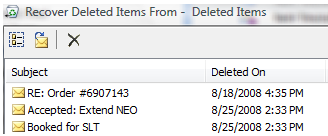
Recover Deleted Files in Outlook 2007
 Chris Leong