Featured Posts

What is a good business idea? Before answering the question, What is a good business idea? Let me ask you this question, do you need a good business idea to start your business? A long time back, my MBA professor once told me that...

Read more

Budgeting for Cradle pre-seed grant I’ve been meaning to write more about the entrepreneur scene in Malaysia, but I just can’t seems to find the time to do that. But I would like to share with any budding entrepreneurs that wants to...

Read more

Budgeting for Cradle pre-seed grant I’ve been meaning to write more about the entrepreneur scene in Malaysia, but I just can’t seems to find the time to do that. But I would like to share with any budding entrepreneurs that wants to...

Read more

Is Friendster better off with MOL? In the last post, i had talked about losing mind share in US. However, Friendster is still very strong in Asia, especially in Malaysia and Philippines. Friendster is the #11 site in Malaysia and #6...

Read more

Friendster is losing mind share in the US – Try searching... Friendster is now Malaysian. Malaysia’s MOL has just bought Friendster a couple of weeks back for an undisclosed sum. It was rumored to be at the region of USD 26 million, a large sum of money considering...

Read more

Import Gmail Contacts to Outlook 2007

Posted by Chris Leong | Posted in Archives | Posted on 06-03-2009

Tags: ,

0

My friend post a question to me about importing Gmail contacts to Outlook. It is actually quite simple to do it, here are some steps to do it.

1) In Gmail, click on contacts. Then select that contacts that you want to import.
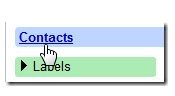
Gmail Export

2) Click Export

Gmail Export Contacts

3) In the next screen, select Outlook CSV contacts

image thumb Import Gmail Contacts to Outlook 2007

4) Next go to Outlook 2007. Click on File –> Import and Export

5) Select “Import from another file”

6) Select “Comma Separated Value (DOS)”

7) Follow the instructions and you should see your Gmail contacts in Outlook

Write a comment