Featured Posts

What is a good business idea? Before answering the question, What is a good business idea? Let me ask you this question, do you need a good business idea to start your business? A long time back, my MBA professor once told me that...

Read more

Budgeting for Cradle pre-seed grant I’ve been meaning to write more about the entrepreneur scene in Malaysia, but I just can’t seems to find the time to do that. But I would like to share with any budding entrepreneurs that wants to...

Read more

Budgeting for Cradle pre-seed grant I’ve been meaning to write more about the entrepreneur scene in Malaysia, but I just can’t seems to find the time to do that. But I would like to share with any budding entrepreneurs that wants to...

Read more

Is Friendster better off with MOL? In the last post, i had talked about losing mind share in US. However, Friendster is still very strong in Asia, especially in Malaysia and Philippines. Friendster is the #11 site in Malaysia and #6...

Read more

Friendster is losing mind share in the US – Try searching... Friendster is now Malaysian. Malaysia’s MOL has just bought Friendster a couple of weeks back for an undisclosed sum. It was rumored to be at the region of USD 26 million, a large sum of money considering...

Read more

Windows 7 will come with XP mode

Posted by Chris Leong | Posted in Random Thoughts | Posted on 29-04-2009

Tags:

0

This is really great news for those guys who is having application compatibility issues with your old apps. Here’s what they had to say in the Windows Blog

Windows XP Mode is specifically designed to help small businesses move to Windows 7. Windows XP Mode provides you with the flexibility to run many older productivity applications on a Windows 7 based PC.

All you need to do is to install suitable applications directly in Windows XP Mode which is a virtual Windows XP environment running under Windows Virtual PC. The applications will be published to the Windows 7 desktop and then you can run them directly from Windows 7.

I will be waiting for Windows 7 RC which will be coming up in early May to test it out.

 windows7xpmode thumb Windows 7 will come with XP mode

100x20 digg button Windows 7 will come with XP mode

Visual Guide to the different usage of Twitter

Posted by Chris Leong | Posted in Digital Marketing, Random Thoughts | Posted on 28-04-2009

Tags: ,

0

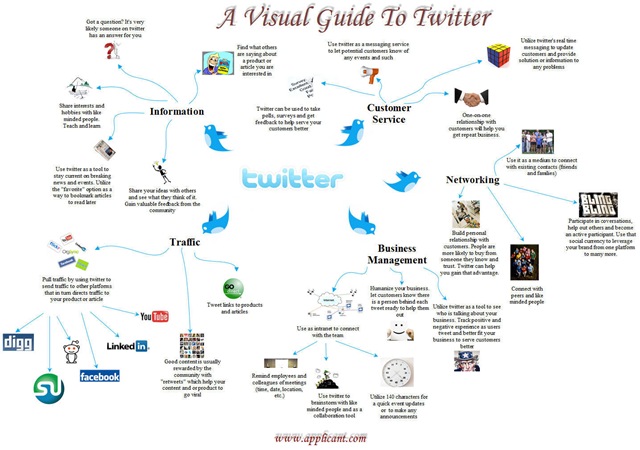
There have been many questions about how Twitter can be use effectively. Here’s a useful guide about the various usage of Twitter. Nothing beats mind map in simplifying  things.


Here’s the guide


tweetcurrency1 thumb Visual Guide to the different usage of Twitter

100x20 digg button Visual Guide to the different usage of Twitter

Now you can use your messenger in Hotmail

Posted by Chris Leong | Posted in Random Thoughts | Posted on 27-04-2009

Tags:

1

After so long Microsoft have decided to add an instant messenger feature to Hotmail. This is one of the things i really wish Hotmail would have, since its rival Yahoo and Google already has a messenger feature in its mail system for quite some time.

But better late than never, now in your Hotmail/Live Mail you can sign in with you Windows Messenger and chat with your friends


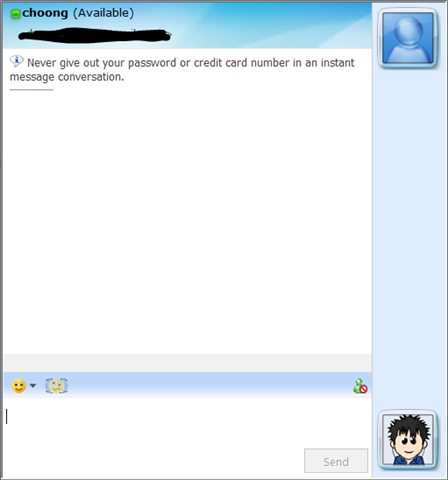
Here’s some snapshots on how it will look like.

image thumb Now you can use your messenger in Hotmail


image thumb1 Now you can use your messenger in Hotmail


P.S

One thing though, this feature is not visible to the average user. Most of my friend did not know that this feature has already been added. Hope, they will make it visible like Gmail does.

Microsoft Innovation Day @ TPM(13th May 2009)

Posted by Chris Leong | Posted in Archives | Posted on 18-04-2009

Tags:

1

Microsoft is having its Innovation day @ TPM. In this event, they will be covering an overview about Windows Azure and covering security vulnerabilities of web applications.

Date: 13th May 2009

Time: 8:30am – 1:00pm

Venue: Resource Center Auditorium, TPM


If you are around the area, do come and checkout.

clip image001 thumb Microsoft Innovation Day @ TPM(13th May 2009)

How to enter data in multiple sheet at the same time in Excel?

Posted by Chris Leong | Posted in Archives | Posted on 18-04-2009

Tags:

1

Here’s another tip that I found on the web. Hope its useful.

In Excel 2007, it’s possible to enter the same data into several worksheets without retyping or copying and pasting the text into each one. As an example, let’s say you want to put the same title text into different worksheets. One way to do this is to type the text in one worksheet, and then copy and paste the text into the other worksheets. If you have several worksheets, this can be very tedious.

An easier way to do this is to use the CTRL key to group worksheets. When worksheets are grouped, whatever you do to one worksheet affects all other worksheets.

  1. Start Excel. A new, blank workbook appears.
  2. Press and hold the CTRL key, and then click Sheet1, Sheet2, and Sheet3.

    This temporarily groups the worksheets. In the title bar, you should see the name of the workbook followed by the word [Group].

  3. Click in cell A1 in Sheet1, and then type:

    This data will appear in each sheet.

  4. Click Sheet2 and notice that the text you just typed in Sheet1 also appears in cell A1 of Sheet2. The text also appears in Sheet3.

    Tip   When you click another worksheet, Excel automatically ungroups the worksheets for you.

Silverlight DeepZoomPix – A new way of showcasing your photos

Posted by Chris Leong | Posted in Archives | Posted on 16-04-2009

Tags: , ,

0

This is a technology demonstration by Microsoft that allows you to view your photo’s in a whole new light. It’s really quite cool and I’m sure you will find it useful too. View a sample from Chris Leong’s DeepZoomPix Album


Here’s some overview of DeepZoomPix

Using Silverlight’s exclusive Deep Zoom technology, DeepZoomPix enables you to interactively explore and share photos like never before:

  • Enable a seamless experience for navigating large numbers of images regardless of Internet connection quality.
  • Make possible a “tactile” way of exploring and interacting with photographic images on the web.
  • Empower users to dynamically zoom in on photos without having to navigate to higher resolution versions.

You can directly access photos from Facebook, Flickr or any photo RSS feed and share your DeepZoomPix creation with the world through your blog or website.


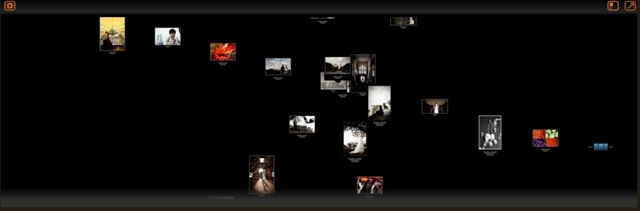
Here are some snapshots of what you can do in DeepZoomPix

1) Different Layouts you can choose from

layouts thumb Silverlight DeepZoomPix   A new way of showcasing your photos

2) Zooming in to your pictures

zoomingin thumb Silverlight DeepZoomPix   A new way of showcasing your photos

3) Slide Show View

deepzoomslideshowview thumb Silverlight DeepZoomPix   A new way of showcasing your photos

4) Some different layouts

differentlayouts thumb Silverlight DeepZoomPix   A new way of showcasing your photos


P.S

  1. These photos are from my buddy Daren Chong. Check out more great wedding photos @ Daren Chong’s Blog
  2. I’ve also share a similar post few months back. Check it out here

Error when open Excel Doc in TFS

Posted by Chris Leong | Posted in Archives | Posted on 15-04-2009

Tags:

0

For those who are getting error when open Excel documents stored on the Team Foundation Server (TFS). Courtesy from Poh Sze.

“TF84037: There was a problem initializing the Microsoft Excel Team Foundation Addin.  Re-installing the Team Foundation Client may be required.”

The reason is because the Office .Net programmability support is not installed.  You need to modify your installed version of Office and install this option.

1.  In Add/Remove programs, locate your Office application and select it.
2.  Click on the ‘Change’ button
3.  Select ‘Add or Remove features’ and click ‘next’
4.  Select ‘Choose advanced customization of applications’ and click ‘next’
5.  In the tree view, expand ‘Microsoft Office Excel’ and make sure the .NET Programmability Support option is set to ‘run from my computer’.
6.  Click ‘update’

DevTalk – Improving Software Quality

Posted by Chris Leong | Posted in Archives | Posted on 14-04-2009

Tags:

0

Apologies for not posting this up sooner. It has slipped my mind with all the deadlines that i need to catch.

Here’s the link to my slides for both session “Build Better Software – Code Performance” and “Governing Software Quality with Visual Studio Team System”

Link to my slides

In the link, you can also find an excel spreadsheet with some recommendation on Capacity Planning. This is courtesy from the ACE team. ACE team is

The ACE (Application Consulting & Engineering) Team is responsible for application performance, security & privacy engineering @ Microsoft.  Our mission is to drive application excellence into production by providing application engineering leadership through world class performance, security & privacy analysis services.

Here is also some great information on Performance Testing Guidance Patterns & Practices and a Quick Reference Guide on Testing with VSTS

Porter 5 Forces – Swiss Knife of Strategy

Posted by Chris Leong | Posted in Tech Business | Posted on 13-04-2009

Tags:

0

Although, this post is not about technology but I always believe in sharing information and knowledge. Recently in my MBA program, i was asked to write about a theory which I find most useful in strategy. So here i will be sharing some of my views about a popular theory called Porter 5 Forces.


Here’s a brief intro about Porter 5 forces for those who don’t know. (Reference from Wikipedia.)

Porter’s five forces analysis is a framework for the industry analysis and business strategy development developed by Michael E. Porter of Harvard Business School in 1979 . It uses concepts developed in Industrial Organization (IO) economics to derive five forces which determine the competitive intensity and therefore attractiveness of a market. Attractiveness in this context refers to the overall industry profitability. An "unattractive" industry is one where the combination of forces acts to drive down overall profitability. A very unattractive industry would be one approaching "pure competition".

In the assignment, I review how Porter 5 forces is useful in many ways and can be combined with multiple theories. It basically provides a good platform for people to view the “market” at different angles. It allows you to analyze:

  • Whether a firm should go upstream or downstream in integrating its operations
  • It’s competitors from various angles

This can be used as basis to decide what kind of strategy to be implemented.

Get the attachment about My Eureka Moments about Porter 5 Forces 

P.S

For those who wants to use my material feel free to do so. Just reference it back to my blog icon smile Porter 5 Forces – Swiss Knife of Strategy

Excel Tips – View Worksheet Side by Side

Posted by Chris Leong | Posted in Archives | Posted on 10-04-2009

Tags:

0

It’s been very long since i posted another office tips and tricks page. I sometimes needs to do that and it really is frustrating when you need to switch between Excel files. I guess this tip will be useful for those who needs to compare worksheet side by side.

So here how you can view your worksheets side by side.

On the View tab, in the Window group, click New Window.

clip image002 Excel Tips – View Worksheet Side by Side

clip image004 Excel Tips – View Worksheet Side by Side

On the View tab, in the Window group, click View Side by Side .

clip image006 Excel Tips – View Worksheet Side by Side

In the Compare Side by Side dialog box, click the worksheets that you want to compare. To scroll both worksheets at the same time, click Synchronous Scrolling  in the Window group on the View tab.


Thanks to Lee Chun Onn that provide me. Have a tips and tricks that you want to share. Email me icon smile Excel Tips – View Worksheet Side by Side