Featured Posts

What is a good business idea? Before answering the question, What is a good business idea? Let me ask you this question, do you need a good business idea to start your business? A long time back, my MBA professor once told me that...

Read more

Budgeting for Cradle pre-seed grant I’ve been meaning to write more about the entrepreneur scene in Malaysia, but I just can’t seems to find the time to do that. But I would like to share with any budding entrepreneurs that wants to...

Read more

Budgeting for Cradle pre-seed grant I’ve been meaning to write more about the entrepreneur scene in Malaysia, but I just can’t seems to find the time to do that. But I would like to share with any budding entrepreneurs that wants to...

Read more

Is Friendster better off with MOL? In the last post, i had talked about losing mind share in US. However, Friendster is still very strong in Asia, especially in Malaysia and Philippines. Friendster is the #11 site in Malaysia and #6...

Read more

Friendster is losing mind share in the US – Try searching... Friendster is now Malaysian. Malaysia’s MOL has just bought Friendster a couple of weeks back for an undisclosed sum. It was rumored to be at the region of USD 26 million, a large sum of money considering...

Read more

Outlook Tips & Tricks – Managing your folders

Posted by Chris Leong | Posted in Archives | Posted on 06-01-2009

Tags:

1

If you are like me, my Outlook mail have too many folders storing different types of emails. Searching for your folders can be messy.

Here are some tips on how to add your frequently use folder in your favourite list.


Favorite folders are shortcuts to your most commonly used folder. Think of it the same as your desktop shortcut. To create a favorite folder, simply drag any folder up to the Favorite Folders area and drop it.

Remember though, if you drag “too many” favorite folders then you will end up with the same problem. So it should some selected folders that you always use


Favorite Folders in Outlook

Favorite Folders in Outlook


The next time you need to access the folder, just click on the favorite folder.

To remove a favorite folder, just right click and select “Remove from favorite folders”. Do not, do not delete as it will delete the original folder as well

Remove folder from favorites

Record a webcast on your desktop

Posted by Chris Leong | Posted in Archives | Posted on 30-12-2008

Tags:

0

Try out Office Community Clip. This is a useful tool that allows you to record your voice and all the activities in the screen in your desktop.

It is very useful tool for you to:

  • record your presentation and share it with others
  • Share your tips and tricks via video rather than text

Download the Office Community Clip and try it out..

VB Futures

Posted by Chris Leong | Posted in Archives | Posted on 23-12-2008

Tags:

0

Wanna know more about how VB 10 looks like.  Visit the links and download the sample codes.
http://code.msdn.microsoft.com/vbfuture.

The Return of the Experts

Posted by Chris Leong | Posted in Archives | Posted on 10-12-2008

Tags:

0

TechNet MSDN Returns

TechNet MSDN Returns

Book your calendars if you want a sneak preview of Windows 7. Microsoft is having an Technet MSDN event to showcase the latest in technologies.


This event will be taking place in Kuala Lumpur Convention Center on the 15th January 2009.


They’ll be showing a 2 hour Microsoft client and server platform demo-relay and a sneak preview of Windows 7!


Go to www.microsoft.com/malaysia/events/technetmsdn/ to reserve a seat.

Office 2007 Add-Ins – Save as PDF

Posted by Chris Leong | Posted in Archives | Posted on 04-12-2008

Tags:

0

A friend of mine asked me what software to install to print office documents to PDF. Microsoft provides an Add-In to allow Office documents to be save as PDF format.

Hope this is useful for people who don’t know about it.

Microsoft Save as PDF

New charting controls for ASP.NET

Posted by Chris Leong | Posted in Archives | Posted on 28-11-2008

Tags:

0

Just found out from Scott Gu’s blog that there is a new charting tool for ASP.NET. You can download it from:

Download the free Microsoft Chart Controls

There are many sampels and documentation on how you can use this control. Now this is much more easier for developers to create interactive charts.

Check out the AJAX enable charts, that’s my favourite

ASP.NET chart Controls

ASP.NET chart Controls


Excel Tips & Tricks – Enter a Fraction in a Cell

Posted by Chris Leong | Posted in Archives | Posted on 28-11-2008

Tags:

0

When doing excel calculation, sometimes I want to display value as 1/3 instead of 0.33333. I just learnt that you can do that in Excel with just a few simple steps.

Microsoft Office Excel can display, and take data entry as, fractions as well as decimal numbers. To enter a fraction, simply prefix it with a zero and a space.


So to display the fraction one-third, type 0 1/3. This will display 1/3 but will have an underlying value of 0.33333333. The cool thing about this, is when you do a simple calculation, it will automatically convert it to fraction for you.

EG. 1/3 X 5 will convert to 1 2/3.

Try it out, I guess this is some of the hidden secrets of Excel that not many people know. At least I don’t, until now.

ALM Workshop – Slides

Posted by Chris Leong | Posted in Archives | Posted on 21-11-2008

Tags:

2

I presented in the Application Lifecycle Management Workshop on 18 Nov, Tuesday on “Governing Software Quality with Visual Studio Team System”.

Here are my slides


If you have a webpage still running on ASP, you can use this tool to check for SQL injections vulnerabilities. Microsoft Source Code Analyzer for SQL Injection

MS Outlook – Tips & Tricks

Posted by Chris Leong | Posted in Archives | Posted on 18-11-2008

Tags:

1

Everytime when I try to focus on doing work, I always got distracted by those pesky email notification. It pops up everytime there is any incoming email. Here is how you disable it.

Turn Off E-Mail Notifications
Because an e-mail notification icon appears whenever you receive new e-mail, it’s tempting to stop work and open new messages immediately. But you can turn off the notification and then check your e-mail when it’s convenient for you. Here’s how:

1. In Microsoft Office Outlook 2007, click Tools, click Options, click E-mail Options, and then click Advanced E-mail Options.
2. In the middle of the dialog box, clear the Display a New Mail Desktop Alert check box.

Office Tips – Save time with Format Painter

Posted by Chris Leong | Posted in Archives | Posted on 14-11-2008

Tags:

0

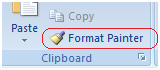
Spend a lot of time on duplicating formats of your Word, Excel or Powerpoint document? There is an easy way of doing this. Use Format Painter.

formatpainter Office Tips   Save time with Format Painter


The Format Painter tool duplicates the formatting from one part of a document to another. So less manual work. How to use it?

  1. Select the text whose formatting you want to replicate. Click the Format Painter toolbar button.
  2. Then duplicate the text by selecting the target texts.